
Tacoma News Tribune: WA Latest
McClatchyNews & Magazines
3.0185.00 Reviews
- Version
- 11.1.16
- Installs
- 10.00K
- Age Rating
- Everyone 10+
Screenshots
Our Review of Tacoma News Tribune: WA Latest
 Analysis by Appyee
I’d approach Tacoma’s news app as a practical way to keep local coverage close at hand, not as a replacement for every source I use. The Tacoma News Tribune Newspaper app is a free news and magazines app from McClatchy, aimed at readers who want a regular look at Tacoma and the wider Puget Sound area. Its appeal is strongest when local developments, sports, and weather matter more to you than a broad national-news feed.
Where a useful routine can get stuck
Even a straightforward news app can feel less simple when you first open it. A stream of headlines is only helpful if you can quickly tell what is local, what is sports, and what is worth reading now. I’d start by scanning the available sections rather than trying to personalize everything immediately. That gives you a feel for the publication’s mix before you decide what deserves your attention.
Notifications can also become a source of friction. Breaking news alerts are useful when a story affects your day, but frequent interruptions can make an app feel like noise. I’d treat alerts as a deliberate choice: keep them on if you want urgent local updates, and quiet them if you mainly check the news at set times. A notification is a prompt to open a story, not a substitute for reading its context.
Readers should also go in with a clear idea of what they want from a local paper. This is a better fit for keeping up with the Tacoma area than for building a complete picture of national or international events. If your main goal is a wide-ranging overview of the day, I’d pair it with a broader news source instead of expecting one local publication to cover everything.
Setup checks that save time
The app is free to install, though in-app purchases are listed from $7.99 to $159.99 per item, so I would check the terms shown in the app before committing to any purchase. The current version is 11.1.2, and the minimum operating system requirement is 8.0. It is rated Everyone 10+, and the app has more than 10,000 installs. Those details are useful context, but the decision to pay should come down to the access and terms presented when you use it, not an assumption that every article or feature is included at no cost.
Its average rating is 3.0 from around 330 ratings, with about 177 written reviews. I read that as a reason to approach it with realistic expectations rather than as proof that the app will or will not work well on your device. A rating can reflect different phones, expectations, and experiences with subscriptions. If you are unsure, try the free experience first and pay attention to what you can actually read before deciding whether a purchase suits you.
If the app does not open or behaves oddly during setup, I’d begin with basic checks: confirm the phone has a working connection, close and reopen the app, and make sure the device meets the operating-system requirement. These are sensible first steps for a mobile app, not a guarantee that they resolve every issue. If a problem continues, noting what you were doing when it happened will make it easier to describe the issue when seeking help.
A workflow for reading without losing your place
For a practical daily routine, I’d use the app in two passes. First, glance at the local headlines when you have a moment; later, open the stories that matter and give them proper attention. This keeps a busy news feed from turning into an endless scroll. Search can help when you want to return to a subject, while saved articles are useful for reading when you expect a poor connection. Save a story while you can still access it, then check that it is available before relying on it offline.
A realistic example is checking local coverage before leaving home, then saving a longer article for a commute or a break when reception may be inconsistent. That is a more dependable use of offline reading than assuming every part of the app works without a connection. Multimedia stories may be less convenient in that situation, so I’d open videos when I have stable service and time to watch rather than treating them like quick text updates.
When something seems missing, I’d first use search and check the relevant section before concluding that the app has lost a story. A local event might be covered under a different topic than you expect, and a headline may not use the exact words you remember. Trying a broader search term is a small but useful trick, especially when following a continuing local issue.
When a problem may be outside the app
Slow loading does not always point to a fault in the app itself. A weak connection can affect article pages, photos, and video differently, so I’d compare a text story with a media-heavy one before deciding the whole app is broken. If headlines load but a video does not, the connection or the size of the media may be the more immediate obstacle. Switching to a steadier network, when available, is a reasonable test.
It is also worth separating an access question from a technical problem. If an article asks you to make a purchase or sign in, that is different from a page failing to load. Read the on-screen terms carefully and decide whether the access offered is worth the cost to you. Readers who want a completely free, broad stream of headlines may prefer a different source; readers who value Tacoma-focused reporting may find the trade-off more relevant.
Getting Started with Tacoma News Tribune
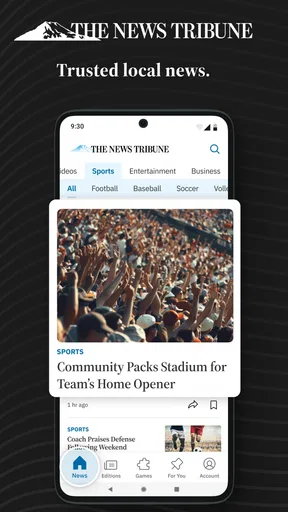
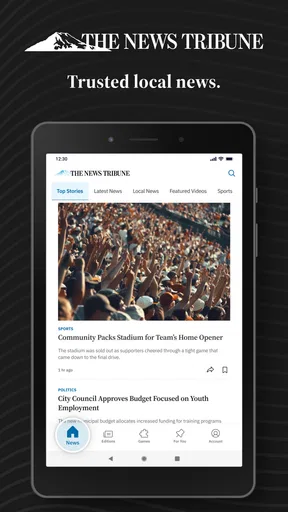
Downloading and setting up the app is a breeze. Available on both Android and iOS, the app provides a seamless experience right from the get-go. Once you’ve downloaded it, you’re greeted with a clean and intuitive interface that makes navigating through the latest headlines a joy rather than a chore.
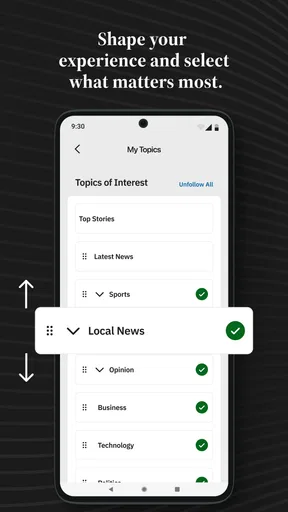
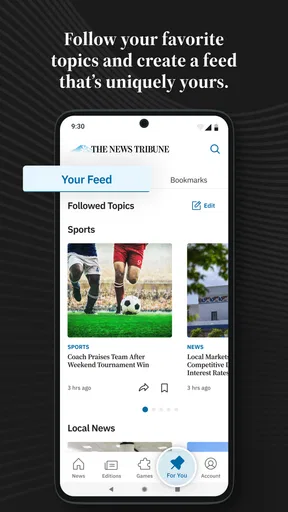
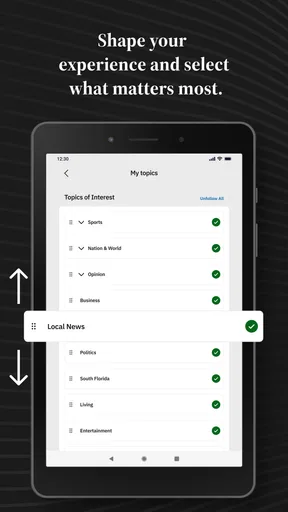
The app offers various sections including local news, sports, and opinion pieces, ensuring there’s something for everyone. You can customize your feed based on your interests, which is a neat feature if you like to keep your news consumption focused and relevant.
User-Friendly Interface
One of the first things I noticed about the Tacoma News Tribune Newspaper app is its user-friendly interface. It’s designed with simplicity in mind, making it easy even for those who aren’t tech-savvy. The layout is clean, with articles categorized neatly, allowing for easy navigation.
The app also includes a search function that works like a charm. Whether you’re looking for the latest Seahawks game highlights or updates on local events, finding what you need is quick and painless.
Staying Informed with Real-Time Updates
In today’s fast-paced world, staying updated is crucial, and this app excels in delivering real-time news. The push notifications are timely, ensuring you never miss out on important news. Whether it’s breaking news or daily headlines, the app keeps you informed throughout the day.
One of my favorite features is the ability to save articles for offline reading. This comes in handy during my commute or when I’m in an area with spotty internet coverage.
Customizable News Feed
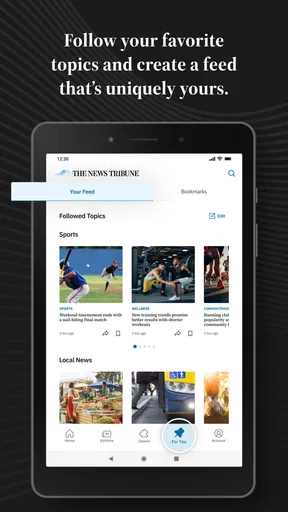
The ability to tailor your news feed is another highlight. You can easily select the topics you’re interested in, from local politics to entertainment news. This personalization makes the app feel uniquely yours, and it's a great way to ensure you’re only getting the news that matters to you.
Engaging Multimedia Content
Another aspect worth mentioning is the app’s multimedia content. The articles are often accompanied by vibrant photos and videos, making the news more engaging. It’s not just about reading; it’s about having a full sensory experience.
The videos load quickly, and the quality is top-notch, which is crucial for those who prefer watching news clips over reading lengthy articles.
Community and Interaction
The app also offers an interactive component where you can comment on articles and engage with other readers. This creates a sense of community and allows for diverse perspectives on various topics. It’s like being part of a virtual town hall, where your opinions matter.
Practical verdict: who should keep it
The app was released on May 12, 2011, and has continued as a focused option for readers interested in Tacoma-area reporting. I would recommend it to someone who wants a convenient way to check local stories, sports, and weather updates without relying only on social media posts that can be scattered or hard to verify. It is less compelling for a reader who wants one app to summarize every major national story or who does not want to encounter paid access options.
Compared with a general news aggregator, a local newspaper app has a narrower editorial focus: that can be a strength when you want community-specific coverage, but a limitation when you want many publishers and viewpoints in one place. Compared with visiting a newspaper website in a browser, an app can make routine checks and saved reading feel more direct. I would choose between them based on your habits: use the app for recurring local checks, and a browser or broader source when you need to compare coverage across outlets.
For someone who is new to the area, the most useful approach is not to turn on every alert or chase every headline. I’d pick a few subjects that affect daily life, such as local developments and sports, then check the app at a time that already fits the day. For a longtime resident, the value is different: it can be a quick way to notice a developing local story and then decide whether it deserves a deeper read. Either way, a focused routine makes the app more useful than constant checking.
The publication is not automatically the right answer for every reader. If you primarily follow national politics, international affairs, or a wide range of specialist topics, a broader outlet will serve you better. If cost is your main concern, review any purchase prompt before proceeding and decide whether the specific access is worth it. And if you mainly want occasional headlines, the free experience may be enough for your needs—or you may prefer a source whose access model better matches how often you read.
Final Thoughts
All in all, the Tacoma News Tribune Newspaper app is a fantastic tool for anyone looking to stay informed. Its user-friendly interface, real-time updates, and customizable features make it a must-have for news enthusiasts.
Whether you’re a long-time resident of Tacoma or just someone who loves keeping up with local news, this app has you covered. So go ahead, give it a try, and see how it transforms your news consumption experience.
My recommendation is more measured: I’d try it if Tacoma and Puget Sound coverage is a regular part of your day, then judge it by how useful its reporting and access options are to you. The 3.0 average is a reminder that experiences differ, so I would not call it essential for everyone. But for a local reader who wants a dedicated place to check regional news, it is worth exploring—with realistic expectations about scope, connectivity, and paid access.
Verdict
Strengths of Tacoma News Tribune: WA Latest
- Comprehensive local news coverage.
- User-friendly interface.
- Frequent updates with breaking news.
- Customizable notifications.
- Offline reading mode available.
Limitations of Tacoma News Tribune: WA Latest
- Limited national news coverage.
- Ads can be intrusive at times.
- Requires subscription for full access.
- Occasional app crashes.
- No dark mode option.
Other Releases by McClatchy
View All
Fort Worth Star-Telegram News
News & Magazines3.0

The Charlotte Observer | News
News & Magazines2.7

Sacramento Bee News California
News & Magazines3.1

Kansas City Star | Local News
News & Magazines2.8
Similar Picks in This Category
View All
Google News - Daily Headlines
Google LLC4.0

X
X Corp.4.8

Flipboard:Your Social Magazine
Flipboard3.4

Opera News: breaking & local
Opera4.5

Hindi News by Dainik Bhaskar
Dainik Bhaskar Group4.0

Way2News Daily News App
Way2News ( Formerly Way2SMS )4.6
Frequently Asked Questions
What features does the Tacoma News Tribune Newspaper app offer?
The Tacoma News Tribune Newspaper app offers a wide range of features including access to the latest local and national news, real-time notifications for breaking news, and a customizable feed. Users can also enjoy in-depth sports coverage, weather updates, and editorial content. The app allows for offline reading and supports sharing articles on social media.
Is there a subscription fee for using the Tacoma News Tribune Newspaper app?
Yes, the Tacoma News Tribune Newspaper app requires a subscription to access its full range of content. While some articles may be available for free, premium content and features require a paid subscription. Users can choose from various subscription plans that can be managed directly through the app.
Can I customize my news feed in the Tacoma News Tribune Newspaper app?
Absolutely! The Tacoma News Tribune Newspaper app allows users to customize their news feed by selecting topics or sections of interest. This feature helps users focus on the news that matters most to them, whether it's local happenings, politics, sports, or entertainment. Personalization options make it easy to stay informed on specific topics.
How user-friendly is the Tacoma News Tribune Newspaper app?
The Tacoma News Tribune Newspaper app is designed with user-friendliness in mind. It features a clean, intuitive interface that makes navigation straightforward. Users can easily browse through different sections, search for articles, and adjust settings. The app also provides a seamless reading experience with adjustable text sizes and offline reading capabilities.
Does the Tacoma News Tribune Newspaper app offer offline reading?
Yes, the Tacoma News Tribune Newspaper app supports offline reading. This feature allows users to download articles and read them later without an internet connection. It's especially useful for commuters or those with limited data plans, providing flexibility to stay updated with the latest news anytime and anywhere.
